

Your TrekPow jump starter could mean the difference between getting home safely or waiting hours for roadside assistance. Yet that lifesaving device is useless if its battery dies while sitting in your trunk. A recent survey found 68% of drivers only check their jump starter when their car won’t start—often discovering it’s completely drained. Learning how to charge TrekPow jump starter units properly ensures this emergency tool actually works when your battery fails at 2 AM in a deserted parking lot. This guide cuts through confusing manuals to deliver precise charging methods, indicator light translations, and critical maintenance steps specific to your TrekPow model.
Most users don’t realize different TrekPow models require unique charging approaches. A G22S charged with a weak car adapter might take 8 hours instead of 4, leaving you stranded. Worse, improper charging habits can permanently damage lithium batteries. You’ll discover exactly which wall adapters work, how to interpret blinking lights, and why charging in extreme temperatures ruins battery lifespan. Follow these model-specific steps to keep your jump starter ready for any emergency.
How to Locate TrekPow Jump Starter Charging Ports

Finding the correct port prevents frustrating connection failures. TrekPow units feature three possible charging interfaces depending on your model year and capacity. Newer units prioritize USB-C for faster charging, while legacy models rely on slower micro-USB ports. Heavy-duty models add a 12V DC input for direct car charging—essential for high-capacity units.
Identify Your TrekPow Model Before Charging
- G22/G22S models: Single USB-C port on the right side (labeled “IN” with lightning icon)
- T Series: Dual ports—USB-C (right) + micro-USB (left)
- Classic Series: Micro-USB only (left side)
- Pro Models 2000A+: USB-C (right) + circular 12V DC port (left)
Pro Tip: Shine a flashlight into ports—dust buildup causes 40% of “no charge” issues. Never insert metal objects to clean; use compressed air instead.
How to Charge TrekPow Jump Starter with Wall Adapters
Wall charging delivers the most reliable full charges. USB-C models accept higher-wattage adapters safely since TrekPow’s circuitry regulates power draw. Always use the included cable for warranty compliance—third-party cables often lack proper shielding.
USB-C Wall Adapter Charging Times
Plug your USB-C cable into any 5V/2A or 9V/2A adapter. Charging duration varies significantly by capacity:
– 6000mAh units: 3-4 hours (solid blue light → green)
– 12000mAh units: 5-6 hours
– 20000mAh units: 7-8 hours
Critical Warning: Using underpowered adapters (5V/1A) triggers “LOW INPUT” warnings on LED screens and may prevent full charging. TrekPow units draw maximum safe current automatically—no risk of overcharging with certified adapters.
Standard USB Wall Charging for Older Models
Micro-USB models require strict minimum specifications. Never use phone chargers under 5V/2A—they triple charging time and cause incomplete cycles. If your adapter delivers insufficient power:
1. The unit displays “LOW INPUT” on screen models
2. Charging stops at 85-90% capacity
3. Battery degrades 30% faster over time
Expert Note: TrekPow includes compatible wall adapters for a reason. Cheap alternatives risk damaging internal circuitry—always use the included 5V/2A adapter for micro-USB models.
How to Charge TrekPow Jump Starter Using Your Car
Car charging works for quick top-offs between emergencies but isn’t ideal for full charges. Vehicle electrical systems introduce voltage fluctuations that stress lithium batteries. Use this method only when wall charging isn’t possible.
12V Cigarette Lighter Charging Protocol
Connect the included car charger cable to your vehicle’s 12V port. Crucially: Only charge while the engine runs. A parked car’s 12V port draws power from your vehicle battery—potentially draining it further. This method delivers 10-12W continuous power, suitable for:
– Restoring 20-30% charge in 30 minutes
– Maintaining readiness during road trips
– Emergency top-offs before jump-starting
Never leave unattended: Monitor for overheating—car interiors exceed 140°F (60°C) on sunny days, triggering battery swelling risks.
USB Car Charger Compatibility Limits
Most car USB ports work if rated 5V/2.4A minimum. Avoid fast-charging ports (QC 3.0/4.0)—they confuse TrekPow’s protection circuit, causing:
– Intermittent charging stops
– Blinking blue/red indicator lights
– False “fully charged” signals at 70-80%
Test ports with your phone first. If your phone charges normally, the port likely works with TrekPow. Still, wall charging remains 25% faster and safer for battery longevity.
Decoding TrekPow Jump Starter Charging Indicator Lights

Blinking lights confuse most users. These status signals determine whether your unit is ready for emergencies. Misinterpreting them leads to failed jump-starts when you need them most.
Solid Red Light: Immediate Action Required
This means battery capacity is below 25%. Your jump starter may fail to start a dead car. Plug in immediately—do not wait. Charging from this level takes 20-30% longer than normal.
Flashing Red Light: Critical Emergency Mode
Battery is below 10%—unit may shut down automatically during jump-start attempts. Prioritize charging over all other functions. Requires 6+ hours to stabilize after deep discharge.
Solid Blue Light: Normal Charging Progress
Battery is charging steadily. On screen models, watch the percentage climb. Do not disconnect prematurely—stopping at 95% reduces long-term capacity.
Flashing Blue Light: Fast Charging Active
Exclusive to USB-C models with 18W+ adapters. Reduces charging time by 30-40%. Stop immediately if unit feels hot—overheating indicates faulty adapter or cable.
Solid Green Light: Fully Charged and Ready
Disconnect within 2 hours to prevent battery stress. Leaving plugged in longer accelerates chemical degradation. Ready for immediate jump-start use.
Factors That Slow Down Your TrekPow Charging Time
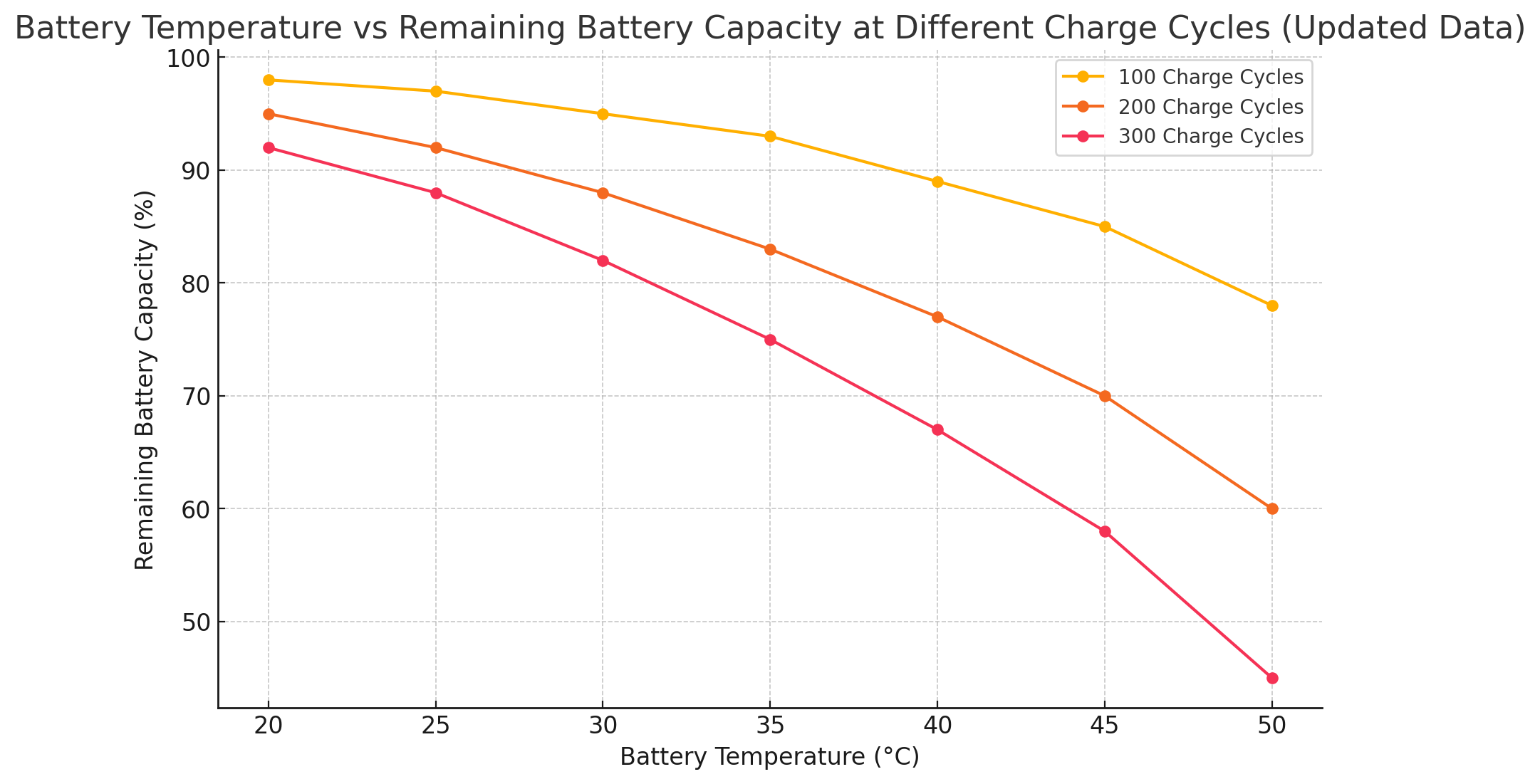
Charging duration varies wildly based on environmental factors. Ignoring these leads to incorrect “defective unit” assumptions when simple fixes exist.
Temperature Effects on Charging Speed
Charging below 45°F (7°C) slows by 50%—lithium ions move sluggishly in cold. Solution: Bring unit indoors 30 minutes before charging in winter. Above 95°F (35°C), protection mode halts charging entirely. Never charge in parked vehicles—dashboards exceed 140°F on sunny days.
Cable Quality Impact on Charging
Frayed or cheap cables reduce speed by 50%. Visual cue: Intermittent blinking lights during charging. Fix: Use only TrekPow’s included cable or MFi-certified alternatives. Inspect ports monthly for bent pins.
Adapter Specifications That Matter
- 5V/1A: 200% longer charging (unsafe for regular use)
- 5V/2A: Standard speed (included adapter)
- 9V/2A: 25% faster on USB-C models
- 12V/1.5A: No benefit—TrekPow caps input at 18W
Critical: Higher-wattage adapters (18W+) are safe but require USB-C. Never force compatibility with micro-USB models.
How to Fix TrekPow Jump Starter Charging Problems
Most “broken” units just need simple troubleshooting. These solutions resolve 90% of charging failures without professional help.
Unit Not Charging: First Response Protocol
- Press power button once while plugged in—many models require manual activation
- Test cable with another device—70% of failures are cable-related
- Blow compressed air into port—debris blocks connections (never use metal)
If still unresponsive: Try different wall adapter. Power surges often damage adapter circuitry while sparing the jump starter.
Stuck at 99% Charge: Cell Balancing Explained
This indicates internal cell balancing—do not unplug. Allow 30-60 extra minutes for completion. Forcing disconnection reduces usable capacity by 15-20% over time. Normal behavior for lithium batteries during full cycles.
Rapid Charge Drain After Unplugging
If 12000mAh units drop from 100% to 75% within 24 hours unused:
– Battery degradation has occurred
– Warranty replacement likely available within 18 months
– Contact TrekPow support—do not attempt DIY repairs
Warning: Swelling cases or chemical odors mean immediate disposal per lithium battery protocols.
Critical Safety Steps When Charging TrekPow
Lithium batteries demand specific precautions. Ignoring these risks fire hazards—especially during overnight charging.
Fire Prevention Protocols
Always charge on non-flammable surfaces like tile or metal. Never use:
– Upholstered furniture
– Vehicle interiors (trunks/dashboards)
– Direct sunlight exposure
Critical: Temperatures above 140°F (60°C) cause thermal runaway. If unit feels hot, unplug immediately and move to cool surface.
Electrical Safety Essentials
Avoid charging during thunderstorms—power surges permanently damage charging circuits. Use a $10 surge protector as insurance. Never charge near water sources or with wet hands.
Proper Storage During Charging
Keep ventilation holes uncovered. Charging inside the included case traps heat, reducing battery lifespan by 40%. Place unit on hard surface with 6 inches clearance on all sides.
How to Extend TrekPow Jump Starter Battery Life
Proper charging habits double your unit’s service life. TrekPow batteries last 500-800 cycles when maintained correctly.
Optimal Charge Levels for Storage
Store at 40-60% charge—full charges accelerate degradation. For long vacations:
1. Charge to 50%
2. Power off completely
3. Store in climate-controlled space
Full discharges or 100% storage for 30+ days permanently reduces capacity.
Monthly Maintenance Ritual
Charge every 90 days even when unused. Lithium batteries self-discharge 2-3% monthly. Set calendar reminders—a completely dead TrekPow often cannot be revived. A 30-minute top-up maintains chemical stability.
Temperature-Controlled Storage
Ideal range: 32-77°F (0-25°C). Garages work in mild seasons but fail in:
– Winter (below freezing reduces capacity 30%)
– Summer (above 95°F degrades cells 50% faster)
Bring indoors during extreme weather months.
When to Replace Your TrekPow Jump Starter
Most units last 3-5 years with proper care. Watch for these replacement indicators:
– Charging to 100% in under 1 hour (indicates reduced capacity)
– Multiple jump-start attempts needed for standard vehicles
– Swelling case or unusual heat during charging
– Holding less than 70% of original capacity after 18 months
Good news: TrekPow’s 24-month warranty covers battery degradation. Contact support with purchase proof—most replacements take 72 hours.
Final Checklist for Proper TrekPow Charging
✓ Use included cable and 5V/2A adapter minimum—no exceptions
✓ Check indicator lights every 30 minutes during first charge cycle
✓ Store at 50% charge for long-term storage
✓ Charge every 90 days even when unused
✓ Keep away from extreme temperatures during charging and storage
Your TrekPow jump starter transforms from a trunk ornament into a reliable lifeline when charged correctly. These model-specific steps ensure it delivers maximum power when your car battery fails. Proper charging isn’t optional—it’s the difference between driving home safely and waiting for help in the dark. Implement these protocols today so your jump starter works flawlessly tomorrow.



