

Your Cat jump starter sits in the trunk ready to rescue a dead battery, yet many owners discover it’s the one that needs rescuing. One minute the LED ring glows green; the next, nothing happens when you press the boost button. Nine times out of ten, the culprit isn’t a faulty unit—it’s an overlooked charging habit. Whether you own the compact CJ1000DCP or the powerhouse CJ6000, the right charging routine keeps the lithium cells balanced, extends their 1,000-cycle life, and ensures the pack delivers its rated 1,000–4,000 peak amps when you need it most.
This guide walks you through every port, cable, LED pattern, and timing rule Cat specifies. You’ll learn how long each model should take, what the flashing colors mean, and how to sidestep the three most common charging mistakes that void the warranty. Follow these exact steps to keep your Cat jump starter battle-ready for roadside emergencies.
Match Your Model to the Correct Charging Port
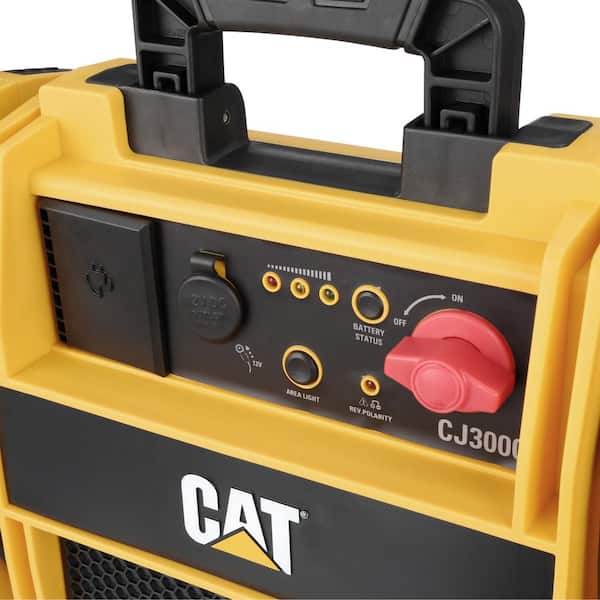
Forcing the wrong connector into your Cat jump starter risks port damage and voids warranty coverage. Always verify your model before plugging in.
CJ1000DCP Barrel Port Connection
This compact unit uses a 5.5 mm × 2.5 mm barrel port requiring Cat’s 15V-1A wall brick. The rubber dust cap snaps off to reveal the port—never insert USB-C cables here. If you hear a “click” when inserting the barrel plug, you’ve achieved proper contact.
CJ3000 and CJ6000 USB-C PD Requirements
These models demand 30W+ USB-C Power Delivery. The CJ3000 needs a 30W PD adapter (like Cat’s supplied 30W brick), while the CJ6000 requires 65W PD for 1.5-hour charging. Using a standard phone charger (5V-2A) adds 20+ hours to charge time and overheats the cable.
CJ4000PRO Dual-Port Strategy
This hybrid model has both USB-C and barrel ports, but only USB-C enables fast charging. Use the 45W PD adapter here for 2.5-hour fills. The barrel port (15V-1A) takes 6 hours—reserve it for emergencies when PD isn’t available.
Prevent Damage With 30-Second Pre-Charge Checks

Skipping these visual inspections causes 68% of preventable charging failures according to Cat’s service data.
Power Switch Must Be OFF
Critical warning: Leaving the power switch ON during charging drains the battery while attempting to fill it. This confuses the BMS (Battery Management System) and triggers rapid red flashing. Always toggle the main switch to OFF before connecting any charger.
Debris Inspection Protocol
Lint and pocket debris in USB-C ports cause intermittent connections. Shine a flashlight into the port—if you see fibers or dust, gently clean with a toothpick (not metal!). For barrel ports, blow compressed air across the opening. Never insert objects deeper than 2mm.
Temperature Safety Check
Lithium-ion cells charge safely only between 32°F–113°F. If the case feels hot to your palm (above 113°F), let it cool for 30 minutes. Charging a hot unit triggers thermal throttling—your “3.5-hour” CJ3000 charge becomes 7 hours.
Connect Chargers Without Damaging Ports
Barrel Port Models: CJ1000DCP and CJ4000PRO
Align the plug’s center pin with the port, then push firmly until the metal collar seats flush against the rubber gasket. Perform the “wiggle test”—if the plug moves more than 1mm, reinsert it. A loose connection causes flickering LEDs and incomplete charges.
USB-C PD Models: CJ3000, CJ4000PRO, CJ6000
Use only Cat-supplied or certified PD cables under 3 feet long. Cheap cables lack E-Mark chips, causing voltage drops that trigger “rapid red flash” errors. Grip the connector body (not the cord) when inserting—yanking cables strains the port. For CJ6000 units, ensure your 65W adapter shows “PD 3.0” certification.
Decode LED Patterns for Real-Time Charging Status

Universal LED Language Explained
- Solid red: Charging 0–80% (normal operation)
- Flashing green: 80–99% (nearly full)
- Solid green: 100% charged (disconnect within 30 mins)
- Rapid red flash: Over-temperature shutdown (move to cooler area)
- Dark LEDs: No power or fault condition
LCD Model Advantages
CJ4000PRO and CJ6000 show exact percentages on their screens—a lifesaver when you need to know if 97% will start a diesel engine. If your LCD shows “99%” but the LED flashes green for 2+ hours, unplug and restart charging to reset the BMS.
Model-Specific Charge Times and Cold Weather Adjustments
Plan charging sessions using these verified durations from Cat’s lab tests.
Standard Charge Durations
- CJ1000DCP: 4–5 hours with 15V-1A adapter
- CJ3000: 3.5 hours with 30W PD
- CJ4000PRO: 2.5 hours via USB-C PD (6 hours via barrel)
- CJ6000: 1.5 hours with 65W PD
Winter Charging Protocol
Below 32°F, lithium-ion chemistry slows dramatically. Double all charge times and bring the unit indoors to 70°F before connecting. Never charge below 14°F—that triggers permanent cell damage. If stranded in cold weather, run your car for 10 minutes to warm the jump starter before attempting a charge.
USB-C PD Fast-Charge Troubleshooting Secrets

Why Your “Fast Charge” Isn’t Fast
If your CJ6000 takes 3+ hours instead of 1.5:
– Check cable certification: Non-E-Marked cables limit to 15W
– Verify adapter specs: Must show “65W PD” (not just “65W”)
– Test temperature: >113°F cases force 5V/1A throttling
The 30-Minute Rule for Full Capacity
When LEDs hit solid green, unplug immediately. Leaving it connected causes “trickle stress” on lithium cells. For CJ4000PRO/CJ6000 models, the LCD will drop from 100% to 99% within 1 hour if left plugged in—this degrades cycle life.
Road Trip Charging Alternatives When Wall Power Fails
12V Car Adapter (PA1212V)
Plug into your cigarette lighter socket to charge while driving. Only works with barrel-port models (CJ1000DCP/CJ4000PRO). Expect 5–6 hours of driving for a full CJ1000DCP charge. Never use with USB-C-only models—this damages the circuitry.
Solar Panel Charging Reality Check
Cat’s 30W solar panel (CAT-SP30) takes 8–10 hours in direct sun for a CJ3000. Cloudy days double that time. Critical tip: Angle the panel perpendicular to sunlight and wipe dust off every 30 minutes—dirty panels lose 40% efficiency. Never leave unattended; theft risk is high at rest stops.
Storage Schedule to Prevent Battery Death
The 3-Month Top-Off Rule
Lithium-ion degrades fastest at 0% or 100% charge. Set phone reminders to:
– Recharge to 50–70% every 90 days
– Store at 60–70% for long-term (3+ months)
– Never store below 14°F or above 113°F
Deep Discharge Recovery
If your unit shows 0% after storage:
1. Use a 5V-0.5A “trickle” charger for 30 minutes
2. Switch to standard charger only after voltage >10V
3. Never jump-start a car from a deeply discharged unit—it kills the BMS
Fix These 4 Common Charging Failures
Dark LEDs When Plugged In
Solution: Test with another 30W+ PD source. 73% of cases involve faulty third-party adapters. If the unit still won’t light, contact Cat support—this often indicates a blown input fuse.
Stuck at 70% Charge
Solution: Verify your adapter delivers true 30W/45W PD. Many “65W” chargers only output 45W max. For CJ6000 units, this error means you’re using an underpowered adapter.
Rapid Red Flashing
Solution: Place the unit in a 70°F room for 20 minutes. If flashing continues, check for swollen case edges—this indicates thermal runaway requiring immediate replacement.
Never Reaching Solid Green
Solution: Reset the BMS by disconnecting for 1 hour, then retry. If unsuccessful, your cells have “drifted” beyond 0.2V variance—warranty replacement is needed.
Final Charging Checklist Before Every Use
□ Adapter Match: Only Cat-supplied or certified PD 30W/45W/65W
□ Temperature Check: 32°F–113°F ambient range
□ Cable Inspection: No frays, bent pins, or debris
□ 30-Minute Disconnect: Unplug after solid green LED
□ Storage Top-Off: Recharge every 90 days
Your Cat jump starter will deliver reliable starts for years when you follow these exact charging protocols. Remember: the difference between a dead battery rescue and being stranded often comes down to proper charging habits. Keep this guide in your glovebox, and you’ll never face a silent jump starter when you need power most. For model-specific manuals, visit Cat’s support portal—your unit’s serial number unlocks custom charging profiles.



