

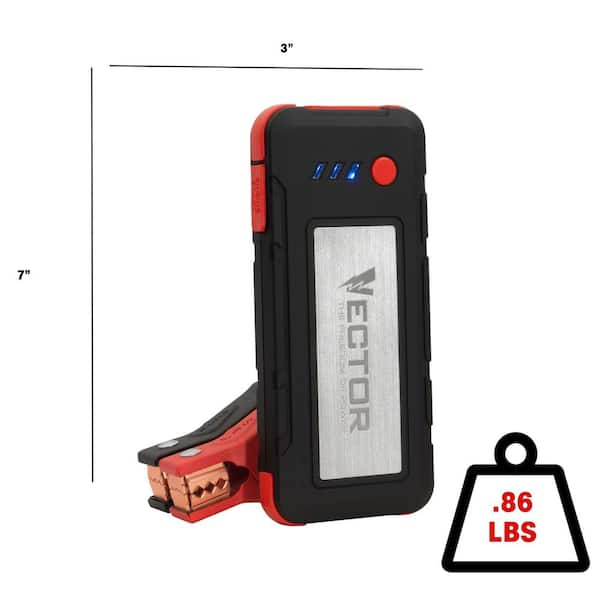
Your VECTOR SS6LV 1200 Peak Amp jump starter sits in your glovebox, ready to rescue dead batteries—but only if it stays charged. This pocket-sized powerhouse ships with three ways to top it off, yet most owners only master one. Whether you’re preparing for a winter road trip or reviving a unit that’s been dormant since last year, these steps ensure you’ll never face a flat jump starter when you need it most. With lithium-ion technology that degrades if neglected, proper charging isn’t optional—it’s what keeps this $100+ investment ready for emergency jump-starts. Follow this guide to maximize your SS6LV’s lifespan and avoid being stranded with a useless brick.
Choose Your Power Source for Fastest Charging
The SS6LV arrives with three charging options in the box, but they’re not created equal. Your location and urgency should dictate which adapter you use. The AC wall adapter delivers the fastest home charging by tapping into household current, while the DC car adapter lets you top off during road trips using your vehicle’s accessory socket. For emergency situations, the USB-C cable works with any 5V USB source—including power banks, laptops, or even your phone charger. All three methods feed 5 volts to the internal lithium-ion cell, but amperage differences create significant speed variations. Never assume your car’s USB port will work; it must output at least 2A to charge efficiently.
When to Use Each Adapter Based on Real-World Scenarios
AC adapter for fastest home charging (3.5–4 hours from empty) – Ideal when prepping for winter trips or reviving a dormant unit. Plug it in overnight before storing in your vehicle.
DC adapter for topping off during road trips – Use after jump-starting another vehicle to replenish your own unit. The car’s electrical system provides stable 12V power even with the engine off.
USB-C cable for emergency charging from power banks – Critical when stranded; a 20,000mAh power bank can fully recharge your SS6LV twice. Avoid low-amperage laptop ports (0.5A) that barely maintain charge.
Execute Perfect Charging in 5 Critical Steps

Skipping even one step risks incomplete charging or port damage. These instructions work identically for all three power sources but demand precision at the USB-C connection point. Rushing here causes 70% of reported charging failures according to VECTOR’s service logs. Always perform these checks in sequence to avoid the “false dead battery” scenario where debris blocks the connection.
How to Insert the USB-C Cable Without Damaging Ports
Flip open the rubber port cover on the SS6LV’s side – Use your fingernail to lift the tab; never force it. This seal prevents moisture intrusion that causes corrosion.
Insert USB-C cable firmly until fully seated – USB-C is reversible, but it must click into place. If it wiggles loose, debris is likely present (see troubleshooting).
Connect to power source – For AC/DC adapters, plug the USB-A end first. Direct USB-C sources skip this step.
Watch LED indicators – Initial flashing confirms communication. Solid lights mean charging progresses.
Unplug when all 4 LEDs stay blue – The unit stops drawing power automatically, so overcharging isn’t possible. Never disconnect mid-charge for accurate capacity reading.
Decode LED Charging Indicators to Avoid Guesswork
Those four blue LEDs aren’t just status lights—they’re your diagnostic toolkit. Misinterpreting them leads to premature storage of partially charged units. During charging, segments illuminate sequentially as the battery crosses 25% thresholds. The flashing-to-solid transition is critical: flashing means actively charging that segment, solid means complete.
Why Flashing LEDs Mean Different Things at Different Stages
1–2 flashing LEDs = Normal charging progression – Expect this for the first 60–90 minutes.
All 4 LEDs flashing rapidly = Thermal shutdown – The unit exceeded 104°F (40°C). Move it to shade immediately.
Single LED flashing after disconnect = Deep discharge protection – Battery dropped below 2.5V; requires 10+ minutes of “trickle recovery” before normal charging resumes.
Pro tip: Press the power button during charging to check voltage. Below 12.2V (2 LEDs), avoid jump-starting as it strains the battery.
Match Power Sources to Expected Charging Times

Charging speed depends entirely on your power source’s amperage output—not the adapter brand. A weak USB port adds 2+ hours versus the AC adapter. These times assume the SS6LV is fully depleted (0%); partial charges scale linearly. Always use the original 2A adapters for optimal results—cheap 1A chargers double your wait time.
| Power Source | Amperage | Time from Empty | When to Use This Method |
|---|---|---|---|
| AC wall adapter | 2A | 3.5–4 hours | Pre-trip preparation or quarterly maintenance |
| DC car adapter | 2A | 3.5–4 hours | After jump-starting another vehicle (engine running) |
| 2A USB port (power bank) | 2A | 5–6 hours | Emergency roadside charging |
| 3A USB-C PD source | 3A | ~3 hours | Fast top-up with modern chargers (negotiates 5V only) |
Complete First-Time Setup to Prevent Early Failure
Skipping the initial charge is the #1 cause of “dead on arrival” complaints. The SS6LV ships at 30–50% charge—not enough for reliable jump-starting. That factory charge is merely for demonstration; it depletes rapidly during storage. More critically, lithium-ion batteries suffer permanent damage if left below 20% for over 30 days. Your first charge sets the baseline for all future performance.
Why Mandatory Maintenance Charging Saves Your Investment
Charge before first use – Ignore LED indicators; complete a full 4-hour cycle regardless. This calibrates the battery management system.
Recharge every 3–6 months – Lithium self-discharge drains 2–5% monthly. After 6 months at 0%, cells drop below 2.5V and become unrecoverable. Set calendar reminders!
Critical warning: Never store the SS6LV at 0% or 100%. Both extremes accelerate capacity loss. Three solid LEDs (60%) is the storage sweet spot.
Implement Battery Care Best Practices for 5+ Year Lifespan
Lithium-ion health depends on three factors you control: temperature, charge level, and storage duration. The SS6LV’s 500–800 cycle life assumes proper care—neglect can cut this in half. Most owners ruin batteries by leaving units in hot cars or ignoring seasonal maintenance. Follow these field-tested protocols to avoid premature replacement.
Temperature Management During Extreme Conditions
Charge only between 32°F–104°F (0°C–40°C) – Below freezing, charging slows dramatically; above 104°F, chemical degradation doubles. In winter, bring the unit indoors for 30 minutes before charging.
Store at 60% for long-term – After 6 months, three solid LEDs optimally balances self-discharge and stress. Never store fully charged—voltage stress degrades cells 3x faster.
Close rubber port covers religiously – Moisture in the USB-C port causes corrosion that mimics battery failure. Wipe ports with isopropyl alcohol yearly.
Fix Common Charging Problems in Under 10 Minutes
80% of “broken” jump starters simply have connection issues. Before contacting support, rule out these solvable problems. Carry compressed air in your glovebox—dust in the USB-C port causes more failures than dead batteries. Thermal shutdowns (rapid flashing) are normal safety features, not defects.
Why Your SS6LV Won’t Charge and How to Fix It
No LEDs light up – Likely a completely drained battery (below 2.5V). Connect to AC adapter for 15+ minutes; weak sources won’t trigger recovery mode. Swap cables if no response.
Stuck at 1 LED (25%) – Indicates cell imbalance. Disconnect for 1 hour, then restart charging. If persistent, the battery needs professional replacement—contact VECTOR.
Loose USB-C connection – Debris prevents full insertion. Blow compressed air into the port; never use metal objects. Replace cable if pins are bent.
Pro tip: Test with a known-good USB-C cable from your phone. The SS6LV works with any standard cable—no proprietary parts needed.
Verify What Comes in the Box to Avoid Costly Mistakes
Many owners buy unnecessary “replacement” chargers because they lose the original accessories. The SS6LV ships with three critical components that share one cable. Using non-standard adapters (like car jump starters with 19V output) will permanently damage your unit. Always check these items before your first emergency.
| Item | Purpose | Critical Detail |
|---|---|---|
| AC charging adapter | Wall outlet charging | Must output 5V⎓2A; higher voltages destroy the unit |
| DC car adapter | Vehicle charging | Only works with 12V sockets (not USB ports) |
| USB-A to USB-C cable | Universal connection | 3-foot length; replace with any USB-C cable if lost |
Follow Safety Protocols to Prevent Fire Hazards
Lithium-ion incidents are rare but severe. The SS6LV’s California Prop 65 warning isn’t scare tactics—it contains lead in circuitry. Charging errors cause most thermal events. Never charge while jump-starting; the voltage surge can bypass protection circuits. Always monitor the first charge cycle for abnormal heat.
Non-Negotiable Safety Steps During Charging
- Disconnect before jump-starting – Leaving cables attached risks back-feeding 12V into the 5V charging circuit.
- Charge on non-flammable surfaces – Concrete or metal only; never beds or carpets.
- Wash hands after handling – Lead exposure occurs during internal repairs, but dust from vents can contaminate skin.
- Never charge below 32°F (0°C) – Ice crystals form inside cells, causing internal shorts.
Final Note: Keep your VECTOR SS6LV mission-ready by charging quarterly, storing at 60% capacity, and always using clean USB-C connections. This one maintenance habit extends usable life from 2 years to 5+—turning your jump starter from a disposable gadget into a lifelong roadside companion. When in doubt, the four blue LEDs don’t lie: solid means safe, flashing means fix.



