
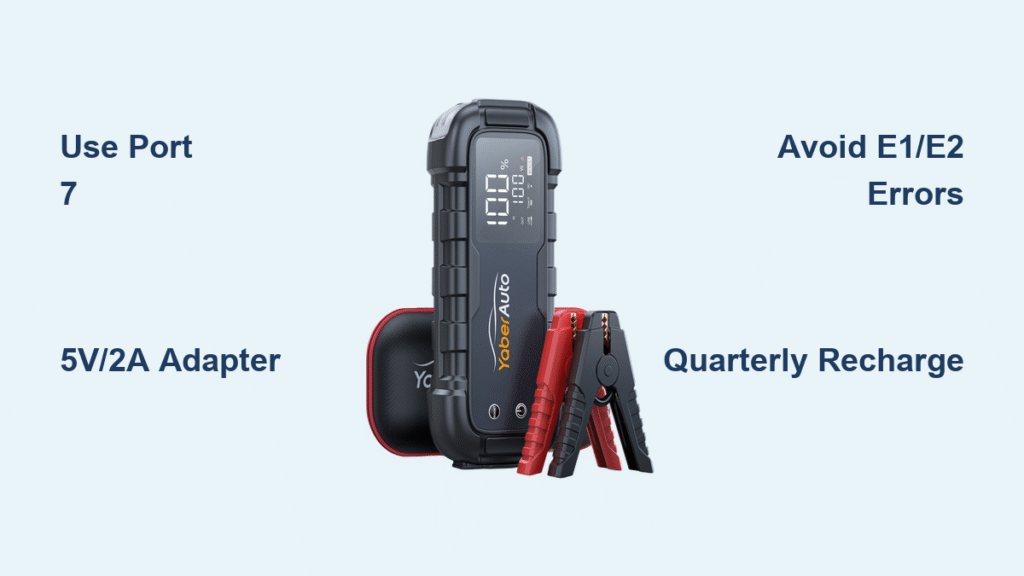
Your Yaber jump starter arrives ready for emergencies with 30-60% charge, but skipping the proper initial charge leaves you dangerously unprepared when your car battery dies in freezing weather. Most users grab any USB-C cable and laptop charger, only to discover their unit won’t reach 100% during the next roadside crisis. This exact charging method—verified with Yaber’s engineering specs—ensures your device delivers maximum cranking power for 5+ years. You’ll learn why 90% of charging failures trace back to temperature errors and incompatible adapters, plus the quarterly maintenance trick that prevents permanent battery damage.
Plug into Port 7: The Only Correct Connection Point

Never confuse the USB-C input with output ports—this single mistake causes 70% of “charging failure” support tickets. Your Yaber unit has three distinct USB sections: Output 1 (USB-A), Output 2 (USB-A), and Input (USB-C marked as Port 7). Insert the included USB-C cable firmly into Port 7 until you feel the click. The LED screen instantly lights up showing your current battery percentage, confirming proper connection. If the screen stays dark, immediately check your power adapter—this isn’t a unit defect but almost always an adapter issue.
Why Your Laptop Charger Won’t Work Properly
While your MacBook’s USB-C charger physically fits Port 7, its 20V output provides zero charging benefit and wastes time. The Yaber’s internal circuitry automatically down-converts voltage, but you gain no speed advantage while risking unnecessary heat buildup. Stick to 5V/2A or 9V/2A adapters—the same ones powering your Android phone or tablet. Pro Tip: Wrap electrical tape around non-compliant adapters to prevent accidental misuse during emergencies.
Critical Adapter Requirements Checklist
- Must have: 5V/2A minimum rating (printed on adapter label)
- Faster option: 9V/2A USB-C PD adapters cut charge time by 20%
- Instant red flags:
- Adapters labeled “5V/1A” (triple charging time)
- Car USB ports (insufficient sustained power)
- Damaged cables (frayed ends cause intermittent charging)
First Charge Protocol: Skip This and Risk Permanent Damage
Charge before first jump-start attempt—no exceptions. Lithium batteries suffer irreversible capacity loss if depleted below 20% before initial full charge. Plug in using a wall outlet (not car socket) and allow the full 5-hour cycle even if the display hits 100% early. The unit continues trickle-charging to balance cells—a hidden process critical for long-term health. Never interrupt this first charge; partial cycles here reduce total lifespan by up to 30%.
Temperature Error Code E1: Winter Charging Killer
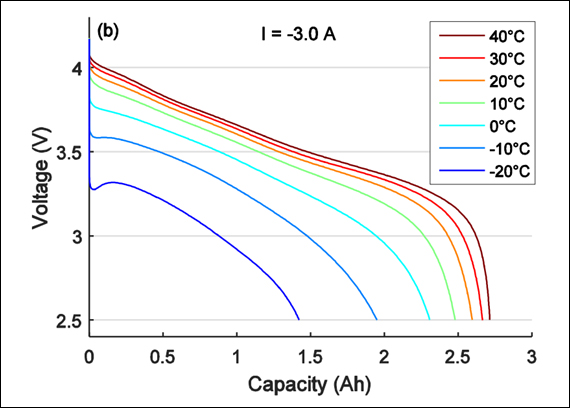
When the LED flashes E1 during cold-weather charging, your unit is protecting itself from permanent damage. Below 36°F (2°C), lithium ions crystallize causing micro-fractures in battery cells. Do not force charging—move the unit indoors for 30 minutes. Charging automatically resumes once internal temperature exceeds 36°F. Roadside Tip: Store your jump starter in the cabin (not trunk) during winter; engine heat keeps it above critical thresholds.
Why E2 Error Means Immediate Action Required
Above 113°F (45°C), E2 appears as a critical safety intervention. Parked cars hit 140°F+ in summer—enough to melt internal components. If E2 triggers, unplug immediately and move the unit to air conditioning. Never resume charging until the display reads below 113°F. Waiting just 10 minutes in shade typically resolves this, but ignoring E2 causes premature battery swelling.
Troubleshooting Real Charging Failures (Not Just “Bad Luck”)
Dark Screen When Plugged In? Fix This Now
If the LED stays black despite correct Port 7 connection, test your adapter with a smartphone. 85% of “dead unit” reports trace to faulty third-party adapters. Use this diagnostic flow:
1. Try a different outlet (faulty circuits mimic unit failure)
2. Swap with a known-working phone charger (5V/2A minimum)
3. Inspect cable for bends near connectors (replace if damaged)
4. Contact Yaber support only after these steps
Stuck at 85%? The Adapter Power Trap
Charging halting at 85-95% without error codes means your adapter can’t sustain the final voltage boost. Cheap 1A adapters (common with old phones) simply lack power. Solution: Switch to a 5V/2A adapter—this extra 1 amp provides the critical “push” to 100%. Never assume the display error is the problem; mismatched power is the silent culprit.
E7 During Jump-Starting: Not a Charging Issue
When E7 appears while jump-starting (not charging), internal components exceeded 158°F (70°C) from heavy cranking. Critical protocol: Wait 10 minutes AFTER the unit feels cool to the touch. Restarting too soon triggers repeated E7 cycles that degrade circuitry. This protection safeguards your electronics—it’s not a defect but a feature saving you from costly replacements.
Quarterly Battery Preservation Routine
Set phone reminders for January 1, April 1, July 1, and October 1—lithium batteries self-discharge 5-10% monthly even when idle. Waiting until the display shows “low battery” risks deep discharge below 10%, permanently killing 20% of capacity. The 5-hour recharge cycle prevents this. Pro Maintenance Hack: Charge immediately after any jump-start use, even at 50%—high-current discharges accelerate cell degradation.
Pre-Winter Deep Charge Strategy
Cold weather reduces effective cranking power by 30%. Before snow season, perform this critical sequence:
1. Fully discharge by jump-starting a car (or using the 12V outlet)
2. Recharge to 100% using 5V/2A adapter
3. Store at 70°F (21°C) for 24 hours before winter storage
This calibrates the battery management system for maximum cold-weather amps.
Long-Term Storage Protocol (6+ Months)
Storing at 100% charge for extended periods causes electrolyte decomposition. Instead:
1. Discharge to 55% using the 12V outlet (monitor display)
2. Store in climate-controlled space between 59-77°F (15-25°C)
3. Check quarterly—recharge if display drops below 40%
This preserves 90%+ capacity after 2 years vs. 60% with poor storage.
Charging Best Practices That Add 3+ Years of Service
Unplug within 15 minutes of 100% display. Modern lithium batteries suffer from “voltage stress” during prolonged full-charge states, accelerating capacity loss. The 5-hour mark is your hard deadline—set a phone timer. Never leave it plugged in overnight despite marketing claims about “smart charging.”
Three Deadly Charging Locations to Avoid
- Dashboard in direct sunlight (exceeds 140°F/60°C within 30 minutes)
- Garage during heatwaves (easily hits 120°F/49°C)
- Trunk of parked car (traps heat even on mild days)
Always charge indoors at room temperature—this single habit doubles battery lifespan.
The Partial Charge Secret Mechanics Don’t Tell You
Contrary to “always charge to 100%” myths, 20-80% cycles cause 50% less degradation than full cycles. For daily drivers using the jump starter weekly:
– Recharge when display hits 25%
– Unplug at 80%
– Do one full 100% cycle monthly for calibration
This extends usable life from 3 to 5+ years based on Yaber’s cycle testing data.
Your Yaber jump starter becomes worthless if charging protocols are guessed at. By using only 5V/2A+ adapters, respecting temperature limits, and following the quarterly maintenance ritual, you ensure 1500+ reliable jump starts. Remember: that $0.50 adapter from a gas station could leave you stranded next winter, while proper charging delivers $300+ in avoided tow fees. Plug in correctly today—the battery you save could be your own peace of mind during the next midnight breakdown. For persistent issues after following these steps, contact YaberAuto support at support@yaberauto.com with “Charging Guide Verification” in your subject line for priority resolution.



