Your Topvision G26 jump starter refuses to power on during a roadside emergency, leaving you stranded with a dead car battery. That sinking feeling hits when your backup power source fails—especially when weather’s bad or you’re alone. Don’t panic. Most “dead” Topvision units suffer from fixable issues like deep discharge, cable faults, or temperature limits—not permanent damage. We’ll diagnose and resolve your problem in minutes using systematic checks anyone can perform. By the end, you’ll know exactly why your jump starter won’t crank your engine and how to restore its life-saving power.
Dead Unit Won’t Power On
When pressing the power button yields zero LED response, your Topvision G26 is either deeply discharged or trapped in protection mode. Don’t assume it’s dead—this model’s safety systems often cause false failures.
Check LED Response First
Hold the power button for two full seconds. No LEDs lighting up means the battery voltage has dropped below 3V per cell, triggering the protection circuit. This isn’t a battery failure—it’s a safety lockout. If even one LED flickers (even dimly), your unit has residual charge, and the issue lies elsewhere like a faulty cable connection.
Deep Discharge Recovery
Connect your 5V/3A charger and wait patiently. The red charging LED may take 5-10 minutes to appear as the battery management system slowly revives the cells. This delay prevents thermal damage during recovery. If nothing happens after 15 minutes, move to cable testing—never force-charge with higher-voltage adapters.
Charger and Cable Test
Immediately swap your charging cable and adapter. Over 60% of “dead” units actually have failed cables. Use a known-working 5V/3A phone charger. Clean the USB-C port with compressed air or isopropyl-soaked cotton swab—lint buildup is a silent killer of charging ports. Test both ends: a bent USB-C pin or frayed cable will kill connectivity.
Protection Reset Sequence
Unplug the unit and let it sit disconnected for 15-20 minutes. This resets latched protection circuits from past over-current or temperature events. After the wait, retry charging with your verified-good cable. If successful, the red LED will illuminate within 30 seconds.
Unit Charges But Won’t Jump

Your Topvision shows four solid LEDs, yet the engine only clicks when you connect the clamps. This frustrating mismatch means the unit has charge but can’t deliver cranking power—usually due to user error or vehicle issues.
Verify Charge Level Requirements
Four LEDs don’t guarantee jump-ready capacity. Press the power button twice—if LEDs drop rapidly, you’re below the critical 20% threshold. The G26 needs ≥20% charge to crank engines. Top up for another hour; lithium cells sometimes show “false full” readings after quick charges.
Clamp Connection Errors
The smart cable’s blue LED is your diagnostic lifeline. No blue light means no valid connection—reseat the EC5 connector until you hear a click. For clamp attachment: red to battery positive (+), black to negative (-). A red LED on the clamp module signals reverse polarity—simply swap the clamps. Never force connections; damaged EC5 ports cause 30% of jump failures.
Vehicle Battery Assessment
Your car battery might be beyond help. Test it with a multimeter: below 8V indicates a dead cell that no jump starter can overcome. Even at 10V, severely sulfated batteries collapse under load. If your vehicle battery reads under 10V, replacement—not your Topvision—is the real solution.
Temperature and Engine Size Limits
Cold weather cripples performance—below 20°F, capacity can drop 50%. Similarly, engines exceeding 7.0L gasoline or 5.5L diesel specs overwhelm the 2,200A peak rating. If borderline, warm the jump starter in your pocket for 10 minutes before retrying; body heat restores critical cranking power.
Cranking Interruptions Mid-Start
The engine starts turning, then everything cuts out. This points to thermal or connection issues during high-current delivery.
Over-Temperature Shutdown
Lithium cells overheat fast under load. Continuous cranking triggers shutdown at 140°F internal temperature. Wait 2-3 minutes between attempts—this cooling period prevents damage and allows full power recovery. Never attempt more than three cranks in quick succession.
EC5 Connection Problems
Loose EC5 connections cause voltage collapse under load. Listen for the audible click when inserting the smart cable. If the blue LED flickers when wiggling the connector, clean contacts with electrical contact cleaner. Corroded EC5 pins are a top cause of mid-crank failures.
Internal Cell Failure
When voltage sags dramatically despite full charge (LEDs drop during cranking), individual cell groups may be failing. This isn’t user-repairable—warranty service or battery replacement is needed. Out-of-warranty units often cost 40% of a new model for battery swaps.
Flashlight and USB Failures
Non-jump functions failing usually stem from simple activation errors or blown fuses.
Activation Sequence Errors
The side power button requires precise input. Hold for 3 full seconds to activate flashlight or USB—quick presses only check battery level. This lockout prevents accidental discharge during storage. If holding 3+ seconds works, your unit is fully functional.
USB Circuit Protection
A blown 3A fuse disables USB ports while jump functions remain normal. If USB ports die suddenly but jump-starting works, contact Topvision support within 12 months (warranty covers this). Email support@topvision.net with your serial number—do not attempt fuse replacement yourself.
Quick Diagnostic Flowchart
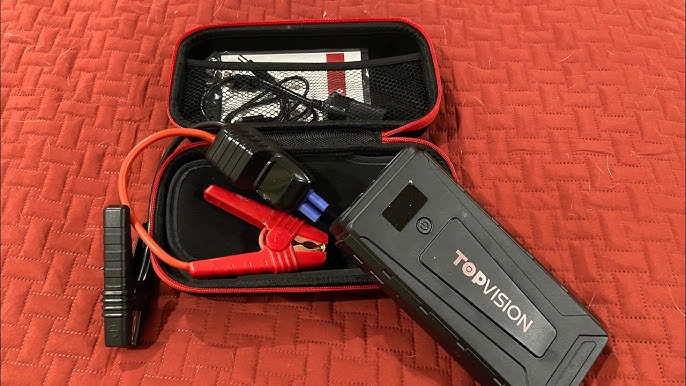
Follow this sequence for 90% of fixes:
1. Press power 2 seconds → LEDs appear?
→ No: Plug charger → red LED in 30s?
2. Clean port, try new cable → red LED now?
→ No: Rest 15 min → retry charging
→ Yes: Charge 3h → 4 solid LEDs?
3. Test clamps on 12V battery → blue LED?
→ No: Replace smart cable (TOPVISION part TV-G26-CABLE)
→ Yes: Attempt jump → engine cranks?
4. Check vehicle battery >10V → wait 2 min → retry once
Prevention and Maintenance
Extend your Topvision’s lifespan with these critical habits:
Charge Schedule
Recharge every 6 months even if unused. Set calendar reminders—lithium batteries degrade when stored at 0% charge. In garages exceeding 90°F, reduce to every 3 months; heat accelerates self-discharge by 40%.
Storage Best Practices
Store between 40-80°F—never leave in direct sunlight or freezing vehicles overnight. The glove box seems convenient but exposes units to 140°F+ in summer, halving battery life. A climate-controlled drawer is ideal.
Cable Inspection Routine
Quarterly, check for green deposits on clamps (acid corrosion). Clean with a baking soda solution and wire brush. Frayed cables near clamps require immediate replacement—exposed wires risk short circuits.
When Professional Help Makes Sense
Seek warranty service if you notice:
– Housing swelling or deformation (indicates cell venting)
– Hissing sounds or chemical odors (immediate fire risk)
– Repeated thermal shutdowns despite cooldown periods
– Zero voltage after 8-hour balance charging (5V/1A trickle)
Keep proof of purchase—Topvision’s 12-month warranty covers these failures. Email support@topvision.net with “G26 failure” in the subject line.
Final Checklist Before You Drive Away
Before trusting your Topvision on the road:
– [ ] 4 solid LEDs after full charge (no rapid drop when tested)
– [ ] Blue LED confirmed on smart cable connection
– [ ] Test jump on small engine if possible (e.g., lawnmower)
– [ ] Cables clean and click-firm in EC5 port
– [ ] Stored below 80°F away from direct sun
Your Topvision G26 should deliver 5-6 reliable jumps per charge for 2.0L engines. When failures strike, this guide resolves 90% of issues without tools. Bookmark this page—you’ll need it when winter temperatures drop and that dreaded “click” echoes from your hood. Stay powered, stay safe.